How to Add a Country or Language Feed to Your Facebook Catalog from Shopify
A Facebook country feed or language feed lets one Meta catalog show local prices to shoppers in France and French titles to French speakers, without building a second catalog. Meta calls this a localized catalog (its help center says "localise your catalogue"): you keep your main feed as it is and add extra feeds on top of it. Each extra feed only needs the product id plus an override column saying which country or language its rows are for. Awesome Feeds can build these feeds for you. You duplicate your main feed, point the copy at the right currency, market or language, type the override value, and add the copy's URL in Commerce Manager. This guide covers the app side and the Commerce Manager side, including the override codes and the product-ID rule that trips most people up.
Don't have Awesome Feeds yet? Install it from the Shopify App Store →
1 How Facebook country and language feeds work
Your main feed holds every product with all its details. A country feed and a language feed are supplementary: Meta matches each of their items to a main-feed item by id, then shows the localized values to people in that country or using that language. Any field a localized feed doesn't supply comes from the main feed. Which one you need depends on what changes:
• Country feed, for what changes by where the shopper is: price, sale price, currency, availability and the product link (for example your .fr storefront or a Shopify Markets URL). The override value is a two-letter country code such as FR.
• Language feed, for what changes by what language the shopper uses: title and description. The override value is a Meta language code such as fr_XX or de_DE.
Meta picks the right version for each shopper automatically, in your ads and in your shop.
2 Choose country feed or language feed
For most Shopify stores selling abroad, start with a country feed. It fixes the part that costs sales: shoppers seeing a price in the wrong currency, or landing on the wrong storefront. Add a language feed when your store publishes translations in Shopify and you want ad copy in the shopper's language. Stores that need both make one country feed per market and one language feed per language. You don't have to trim fields for either type. The app exports every product field in every feed, and Meta takes the localized values that fit the feed type and falls back to your main feed for the rest.
3 Duplicate your main feed
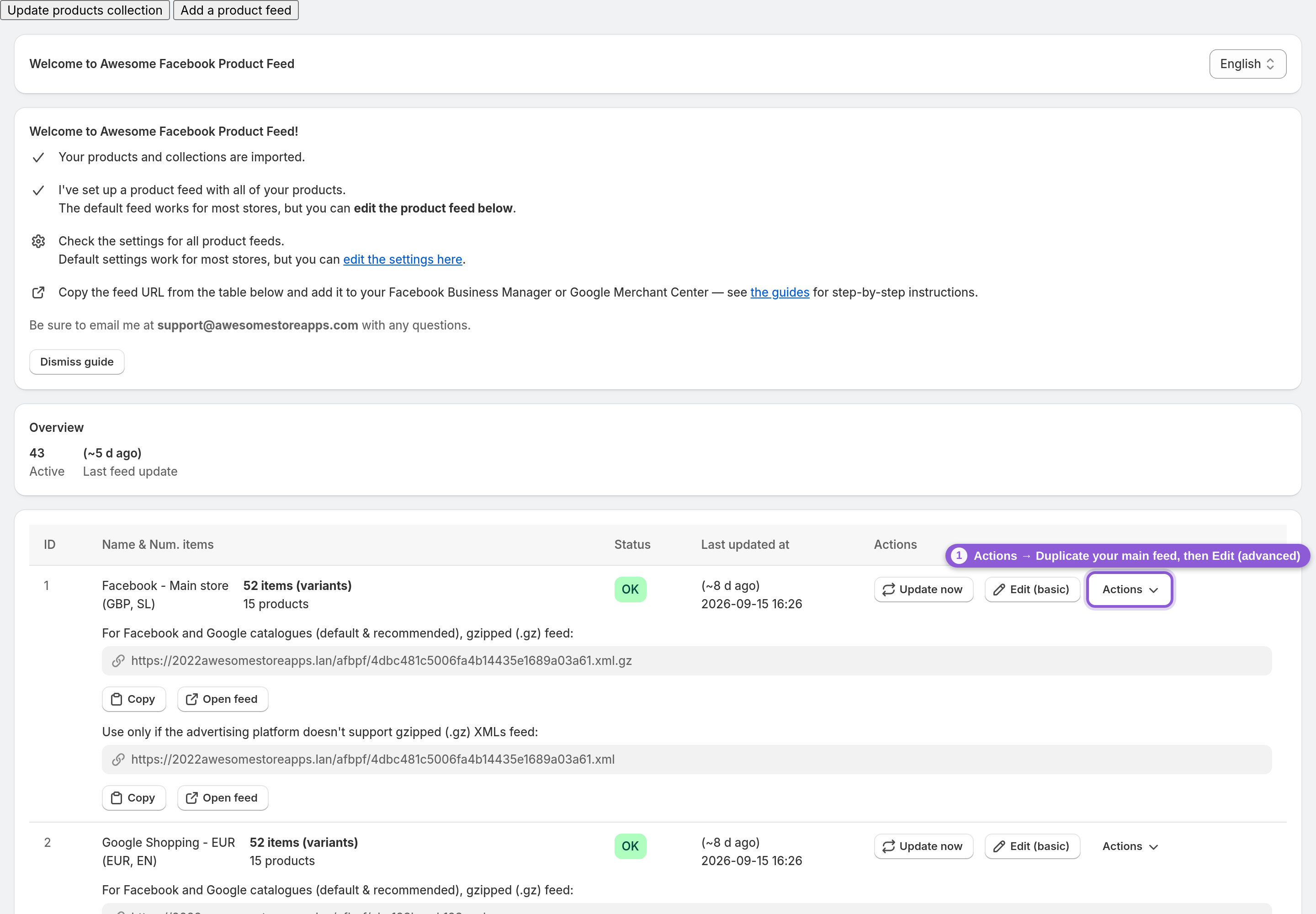
The easiest way to build a localized feed that matches your main feed item-for-item is to copy it. On the dashboard, open your main feed's Actions menu and click Duplicate. The app creates a copy named "… (Copy)" with the same collections, filters, variant settings and Product ID format, which is what keeps the ids identical in step 7. Then open the copy's Actions menu again and choose Edit (advanced). Give it a clear name like "Country feed: France" so you can tell your feeds apart later. Repeat this for every country or language you add.
4 Country feed: set the currency or Shopify Markets country
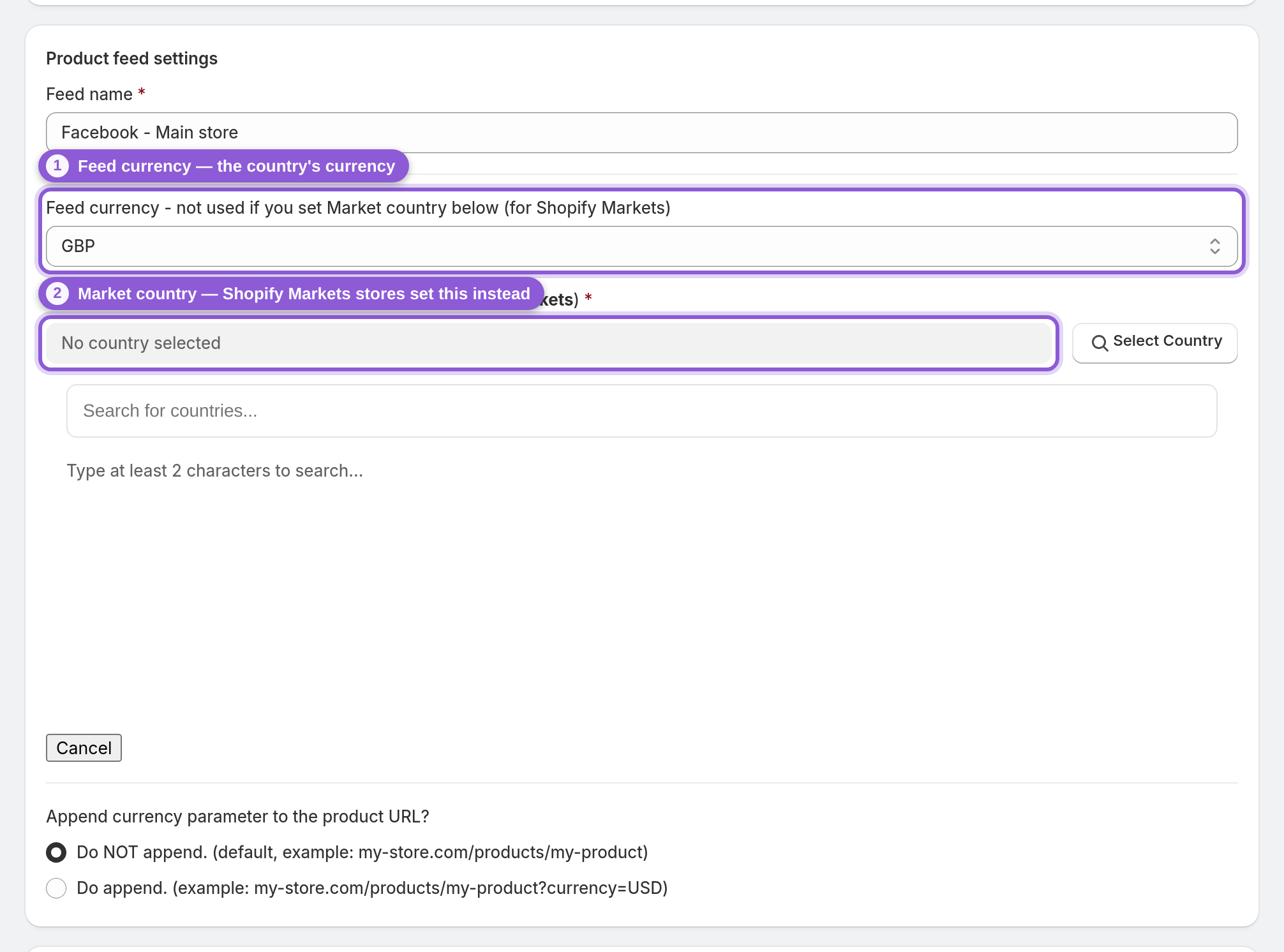
In Product feed settings, point the copy at the country you're localizing for. If your store uses Shopify Markets, set Market country to that country. The app then exports that market's own prices, currency and storefront URL, which is exactly what a Facebook country feed should carry. Not on Markets? Set Feed currency to the country's currency instead. Use one or the other: Market country wins when both are set. If the app asks you to authorize the read_markets permission the first time, approve it and refresh the page. For a country feed, leave Language (locale) and Export translated data? as they are on your main feed. Ship that country from its own warehouse? Then also point the feed's stock at it. In Stock settings, change Export stock from Export stock from all locations to that location, so the country feed's availability reflects only the stock those shoppers can actually get. By default every feed adds up the stock of all your locations.
5 Language feed: pick the language and URL format
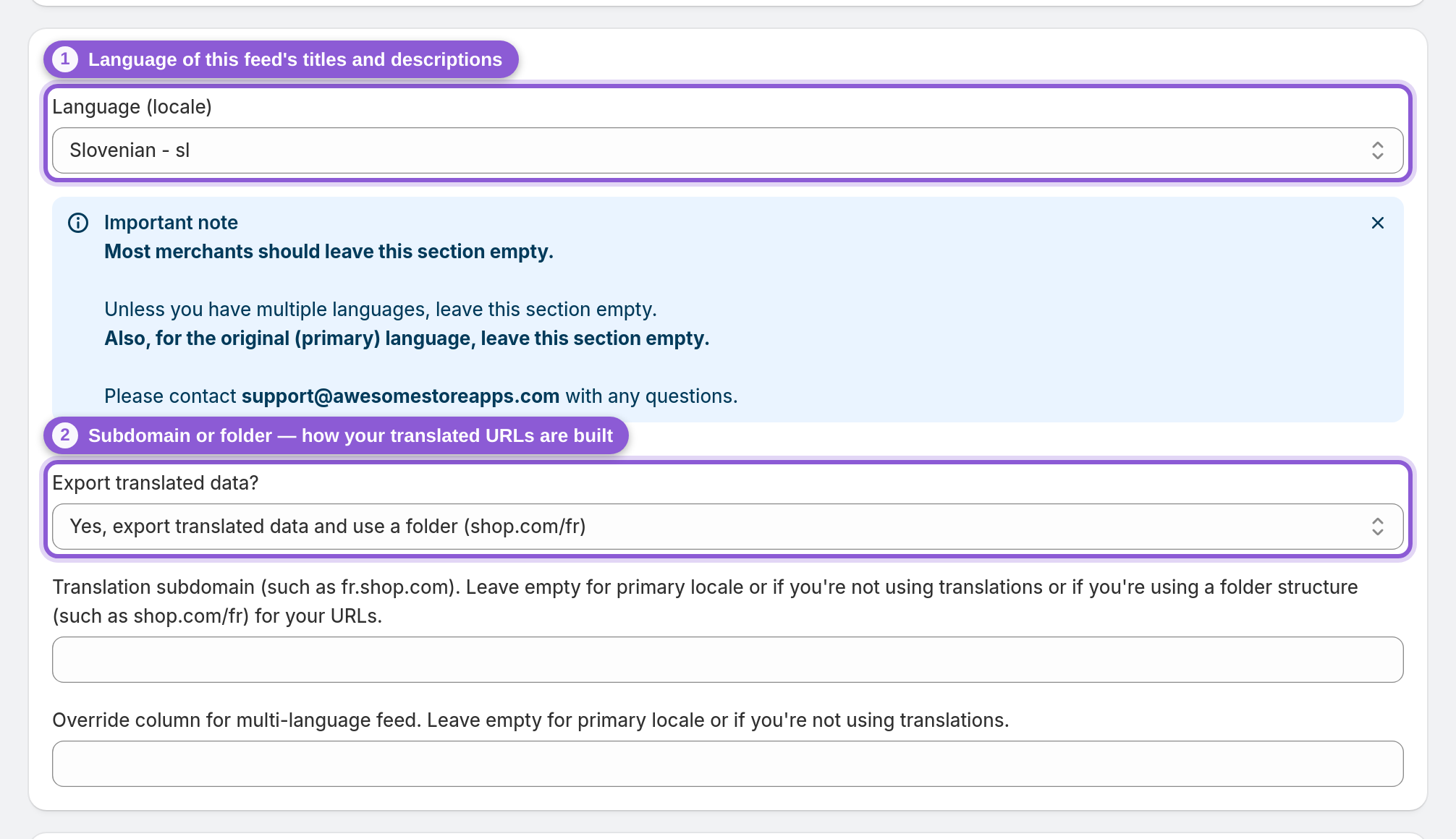
For a language feed, scroll to Multi-language support. Set Language (locale) to the language you're adding, and set Export translated data? to match how your storefront serves translations: a subdomain (fr.shop.com, then also fill in Translation subdomain) or a folder (shop.com/fr). The copy then exports translated titles, descriptions and product links for that language. The first time, the app may ask you to authorize read_translations and read_locales. Approve, refresh, and the fields work. Every field is covered in Multi-language and multi-currency feeds.
6 Set the override value
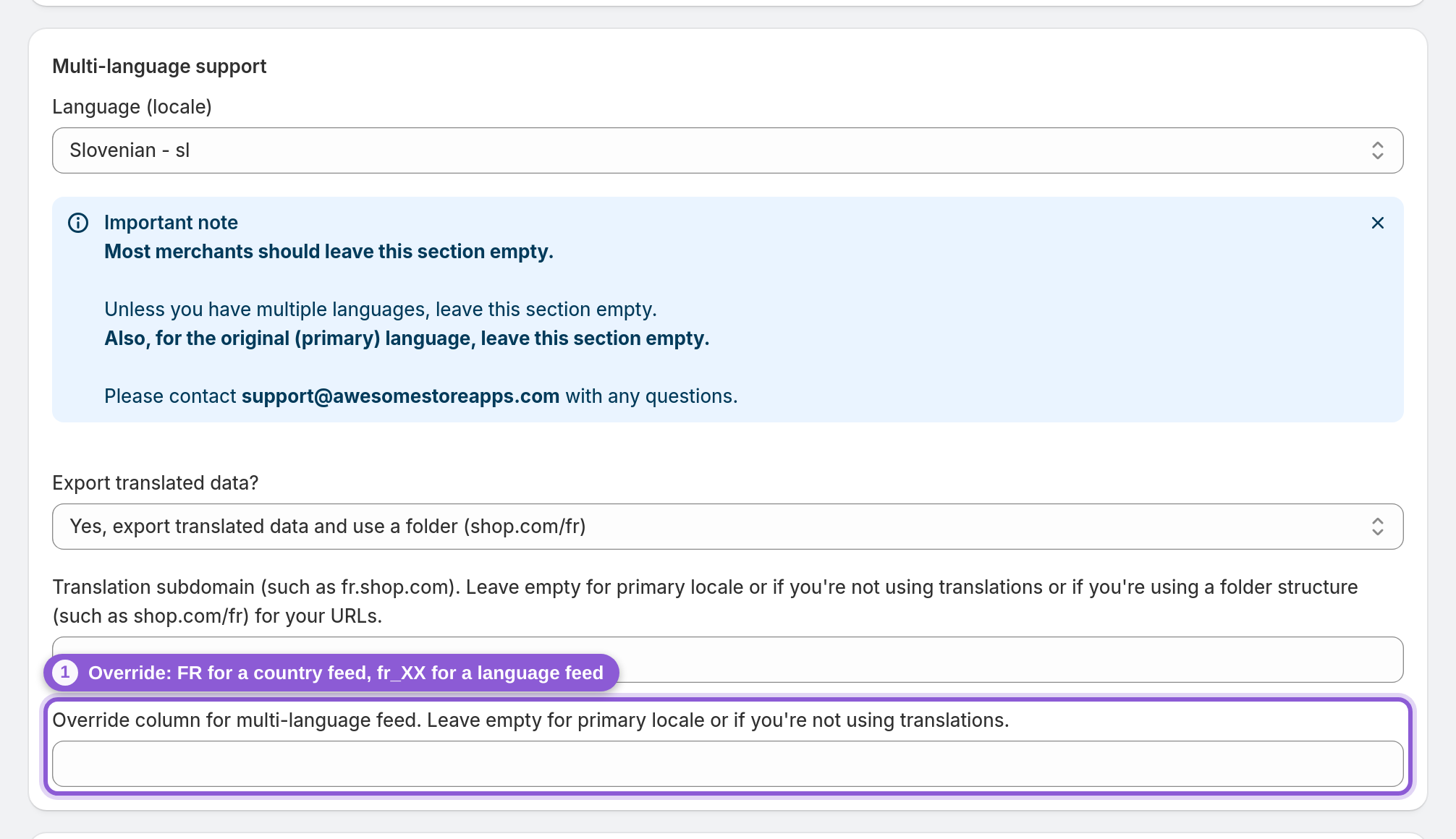
This is the field that turns an ordinary feed into a Meta country or language feed. In Override column for multi-language feed, type the value Meta should read from every item of this feed. The app writes it into each item as the feed's override column:
• Country feed: the two-letter ISO country code, in capitals, such as FR, DE, GB or US.
• Language feed: Meta's language code. Watch out, the pattern isn't consistent: some languages end in _XX, most carry a country. The common ones from Meta's list:
• en_XX English, fr_XX French, es_XX Spanish, pt_XX Portuguese, nl_XX Dutch, ja_XX Japanese, no_XX Norwegian
• de_DE German, it_IT Italian, pl_PL Polish, sv_SE Swedish, da_DK Danish, fi_FI Finnish, cs_CZ Czech, sk_SK Slovak, sl_SI Slovenian, hr_HR Croatian, hu_HU Hungarian, ro_RO Romanian, el_GR Greek, tr_TR Turkish, ko_KR Korean, ar_AR Arabic, he_IL Hebrew
• zh_CN Chinese (China), zh_TW Chinese (Taiwan)
Anything else: copy the exact code from Meta's list of supported languages and countries. One value per feed, so one feed per country or language. Your main feed keeps this field empty. An override on the main feed would turn your whole catalog into a localized copy.
7 Keep the Product ID format identical to your main feed
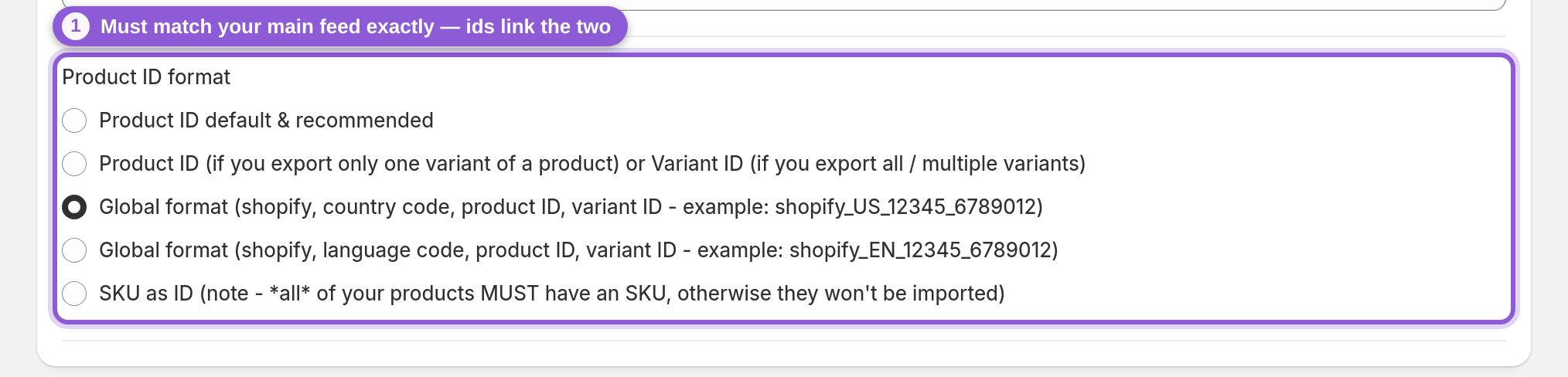
Meta links a localized item to its main-feed item only by id. If the two feeds use different id formats, nothing matches and the localized feed does nothing. In Commerce Manager this usually shows up as missing or unmatched overrides. A duplicated feed already has the same Product ID format (in Other settings at the bottom of the Advanced editor), so just check it matches your main feed and don't change it. The same goes for the products themselves: a localized feed can only localize items that exist in the main feed. More on the id formats in Product IDs and Facebook pixel matching.
8 Save and copy the feed URL
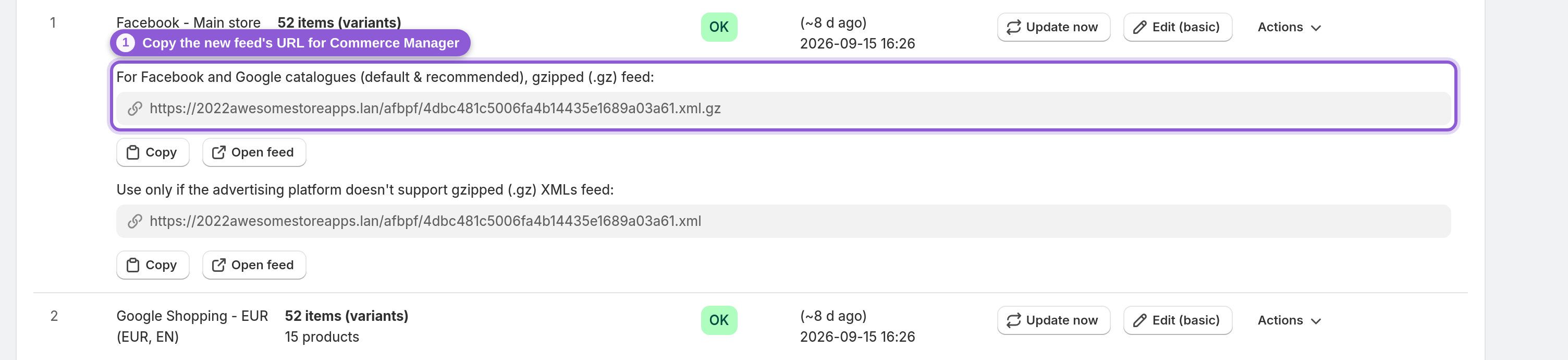
Save from the bar at the top. The feed generates and then keeps updating on its own as your products change. Back on the dashboard, find the new feed's row and click Copy under its gzipped (.xml.gz) feed URL, the default and recommended one for Facebook. You'll paste it into Commerce Manager next.
9 Add the country or language feed in Commerce Manager
In Meta Commerce Manager, select the catalog that already uses your main feed, open the Catalogue tab and go to Data sources. Then:
• Click + Add and choose Country or language data from the drop-down.
• Select Upload file, then Country feed or Language feed, matching the override you set in step 6.
• Choose Scheduled feed, paste the feed URL from step 8, and pick how often Meta should fetch it (daily is a good default).
• Name the feed and select Save feed and upload.
The new feed then shows up under Data sources. To check it worked, open the Products tab, click an item, and switch the country or language drop-down on its product page: you should see the localized price, link or title. Nothing changes? Compare the ids with your main feed (step 7). While you're in Commerce Manager, also check that your default country and language are set under Settings → Localisation. Is your catalog synced from Shopify's Facebook & Instagram sales channel instead of a main feed? Then Shopify owns price, sale price and availability in that catalog, and Meta won't take those fields from a country feed (it flags them with Some information in this feed couldn't be applied). Shopify sends the country prices of your Shopify Markets to that catalog itself; check a product's International coverage to see them. Country feeds from the app work on a catalog whose main source is a feed, such as your main feed from this app.
10 Repeat for each country and language
Each localized feed covers one country or one language, so add them one at a time: a country feed for France (FR, euros), one for the UK (GB, pounds), a language feed for French (fr_XX), another for German (de_DE), and so on. Once they're in, Advantage+ catalog ads and dynamic product ads on that catalog pick the right price, currency, link or language for each shopper automatically, with no separate catalog per country.
Frequently asked questions
What is a Facebook country feed?
A supplementary feed in your Meta catalog that overrides location-specific details, such as price, sale price, currency, availability and product link, for shoppers in one country. Each item carries the same id as in your main feed plus an override column with a two-letter country code like FR. Build one in the app by duplicating your main feed, setting its currency or Shopify Markets country, and typing the country code into the override field.
What is a Facebook language feed?
A supplementary feed that gives Meta translated titles and descriptions for people using a given language. The override column holds a Meta language code like fr_XX or de_DE. In the app, duplicate your main feed, pick the language in Multi-language support, and set the override to the language code. Your store needs to publish translations in Shopify for this to work.
What do I put in the override column for a Facebook catalog?
A two-letter ISO country code in capitals (FR, DE, US) for a country feed, or a Meta language code for a language feed, such as fr_XX (French), es_XX (Spanish) or de_DE (German). Use one value per feed, and leave the override empty on your main feed.
What are the Facebook (Meta) catalog language codes for a language feed?
Meta's own list, and it isn't consistent. English, French, Spanish, Portuguese, Dutch, Japanese and Norwegian use _XX (en_XX, fr_XX, es_XX, pt_XX, nl_XX, ja_XX, no_XX). Most others carry a country, like de_DE German, it_IT Italian, pl_PL Polish, sv_SE Swedish or zh_CN Chinese. Guessing the pattern (de_XX, it_XX) is a common reason a language feed doesn't match.
Should I use a country feed or a language feed?
Use a country feed when prices, currency, availability or links differ by country. That's the most common need. Use a language feed when you want translated ad text. Stores that need both add a country feed per market and a language feed per language.
Why is my Facebook country or language feed not working?
Almost always the product ids. Meta matches localized items to the main feed by id only, so the localized feed must use the same Product ID format and include the same products as your main feed. Duplicating the main feed in the app keeps both identical. Also check the override value: language codes don't follow one pattern (fr_XX but de_DE), so copy yours from Meta's list. And make sure you picked the matching feed type in Commerce Manager.
Why does Meta say "Some information in this feed couldn't be applied" on my country feed?
Usually because the catalog is synced from Shopify's Facebook & Instagram sales channel. In a Shopify-synced catalog Shopify owns price, sale price and availability, so Meta won't apply them from a country feed. Shopify sends your Shopify Markets prices to that catalog itself (check a product's International coverage in Commerce Manager). To use country feeds from the app, add them to a catalog whose main source is a feed, such as your main feed from this app.
Can a country feed use stock from one warehouse only?
Yes. In the country feed's Stock settings, set Export stock to that location instead of all locations. The feed's availability then reflects only that warehouse's stock, while your main feed can keep using all locations or its own one.
How do I localize my Facebook catalog for multiple countries?
Add a country feed for each market on top of your main feed, instead of building a catalog per country. In Commerce Manager that's Data sources → + Add → Country or language data. Meta's help center calls it localising your catalogue. Each country feed carries that market's prices, currency and links, matched to your main feed by product id.
Do I need a separate Facebook catalog for each country?
No. One catalog with a main feed plus country and language feeds serves every market. Meta shows each shopper the localized price, currency, link or text automatically, so your Advantage+ catalog ads and dynamic product ads can run on a single catalog.
Can I use Shopify Markets prices in a Facebook country feed?
Yes. Set the feed's Market country to the market you're localizing for. The app exports that market's prices, currency and storefront URL, which is exactly what a country feed should carry. Then set the override to the same country's two-letter code.
Does the main feed need an override value?
No, leave it empty. The main feed is the default every shopper falls back to. Only the extra country and language feeds carry an override.
How often does Facebook update a country or language feed?
As often as the schedule you set when adding it in Commerce Manager. The app regenerates the feed automatically as your products change, so a daily schedule keeps localized prices and translations in step with your store.