7 Gründe, warum dein Facebook-Produktfeed nicht aktualisiert wird (und wie du jeden behebst)
Wenn dein Facebook-Produktfeed nicht aktualisiert wird – der Feed hängt bei „Updating“, ein Status meldet ein Problem oder Produkte sind nie in deinem Katalog angekommen –, dann atme erst einmal durch. Fast jeder Fall lässt sich auf einen der sieben Gründe unten zurückführen, und meistens musst du gar nichts beheben: Der Feed wird gerade neu erstellt, oder ein Filter macht genau das, was du eingestellt hast. Die Gründe sind von häufig nach selten sortiert, jeweils mit Hinweisen, wie du sie in deinem Dashboard erkennst und was du dagegen tun kannst. Wenn du einfach sofort einen frischen Build möchtest, stellt der Button Update now neben dem Feed sofort einen in die Warteschlange – deine Einstellungen werden dabei nie verändert.
Sie haben Awesome Feeds noch nicht? Jetzt im Shopify App Store installieren →
1 Der Feed wird gerade neu erstellt
Jeder Feed in deinem Dashboard trägt ein Status-Badge, und das beantwortet die meisten Fragen à la „Ist mein Feed kaputt?“ schon von selbst:
• OK – der Feed ist vollständig erstellt und live. Nichts zu tun.
• Updating, please wait – der Feed wird gerade neu erstellt. Das ist normal, und wie lange es dauert, hängt von der Größe deines Katalogs ab. Es ist kein Fehler.
• Error – der Feed enthält mehr Produkte, als dein aktueller Tarif erlaubt. Siehe Grund 5.
• Paused / Inactive – der Feed wird nicht generiert. Siehe Grund 6.
Ein Badge mit Updating, please wait ist der häufigste Grund, warum Leute denken, ihr Feed „funktioniert nicht“ – er funktioniert, er wird nur gerade erstellt. Dein bestehender Feed wird währenddessen weiter ausgeliefert, und der Status aktualisiert sich direkt an Ort und Stelle, du musst die Seite also nicht neu laden. Wenn ein Feed deutlich länger auf Updating steht, als der Build selbst bei einem großen Shop dauern sollte, klicke auf Update now, um ihn erneut in die Warteschlange zu stellen. Wenn er sich dann immer noch nicht einpendelt, wende dich an den Support.

2 Du hast gerade eine Einstellung gespeichert, daher wird der Feed komplett neu erstellt
Jedes Mal, wenn du einen Feed über Edit bearbeitest und speicherst, erstellt die App ihn komplett neu und zählt die Produkte neu – denn eine geänderte Einstellung (Kollektionen, Filter, Variantenregeln, Währung) kann ändern, welche Produkte in den Feed gehören. Deshalb springt das Badge nach dem Speichern sofort auf Updating, please wait. Das ist so vorgesehen: Warte, bis es wieder OK anzeigt, dann sind deine Änderungen live.

3 Facebook hat deinen Feed noch nicht erneut abgerufen
Es gibt zwei Uhren, und nur eine davon gehört der App. Die App generiert deinen Feed automatisch neu, und zwar auf zwei Wegen:
• Wenn sich dein Shop ändert. Wenn du ein Produkt bearbeitest, einen Preis änderst, den Lagerbestand aktualisierst oder eine Kollektion umorganisierst, stellt die App den betroffenen Feed zur Neuerstellung in die Warteschlange. Zwischen zwei Neuerstellungen wartet jeder Feed eine Weile: etwa 16–24 Minuten bei Feeds mit bis zu 1.000 Produkten, etwa 80–120 Minuten bei 5.000 Produkten und mehrere Stunden bei sehr großen Feeds.
• Bei einem regelmäßigen Sicherheitsdurchlauf. Auch ohne Änderungen wird jeder aktive Feed mindestens alle paar Stunden im Hintergrund aktualisiert, damit er nie veraltet.
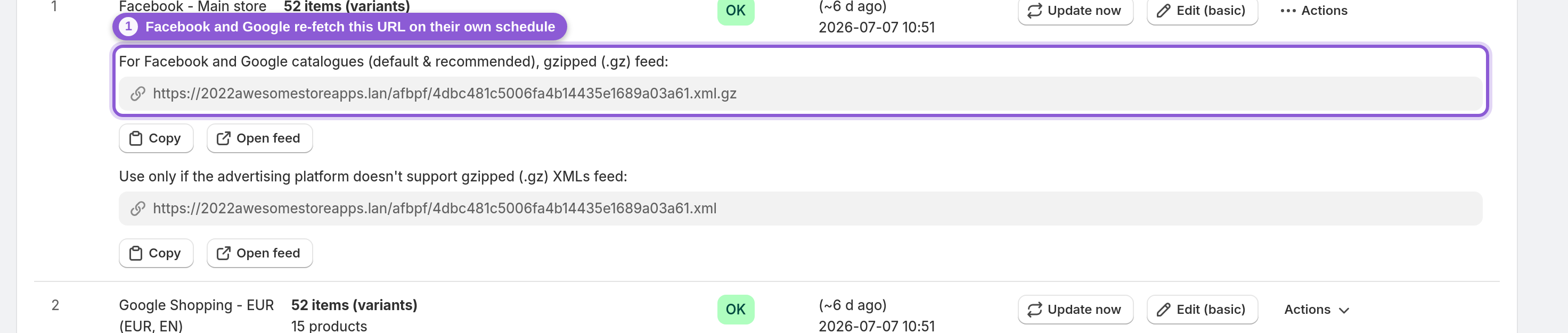
Unabhängig davon rufen Facebook und Google deinen Feed nach ihrem eigenen Zeitplan ab – dem Zeitplan, den du festgelegt hast, als du die Feed-URL als geplante Datenquelle im Facebook Commerce Manager oder im Google Merchant Center hinzugefügt hast (oft stündlich oder täglich). Eine Änderung kann also schon Minuten in deiner Feed-URL live sein, bevor Facebook sie das nächste Mal abruft. Klicke auf Update now, um sicherzustellen, dass der Feed selbst aktuell ist – damit wird sofort eine Neuerstellung eingeplant, deine Produkte werden neu gezählt und ein pausierter Feed wird reaktiviert –, und warte dann auf den nächsten Abruf der Plattform.

4 Filter oder Kollektionen schließen die fehlenden Produkte aus
Wenn Produkte in deinem Facebook- oder Google-Katalog fehlen, macht der Feed fast immer genau das, was seine Einstellungen vorgeben. Sieh dir die Artikelanzahl unter dem Namen jedes Feeds an – ist sie niedriger als dein tatsächlicher Katalog, werden Produkte durch irgendetwas ausgeschlossen. Die üblichen Verdächtigen:
• Der Feed ist auf ausgewählte Kollektionen eingestellt, und die fehlenden Produkte sind nicht in diesen Kollektionen.
• Ein Variantenfilter oder ein ausgeschlossener Tag filtert Produkte heraus.
• Die Produkte sind ausverkauft, und der Varianten-Exportmodus des Feeds ist auf alle verfügbaren Varianten ohne ausverkaufte eingestellt (standardmäßig werden ausverkaufte Varianten als nicht vorrätig exportiert).
• Die Produkte sind nicht im Verkaufskanal veröffentlicht oder haben keinen Preis bzw. kein Bild.
Öffne den Editor des Feeds, um diese Punkte zu prüfen. Unsere Anleitung Produkte und Varianten filtern führt dich durch jeden Filter, damit du genau siehst, was behalten und was aussortiert wird. Korrigiere die Einstellung, speichere, und der Feed wird mit den richtigen Produkten neu erstellt.

5 Der Feed enthält mehr Produkte, als dein Tarif erlaubt
Ein Feed, der das Produktlimit seines Tarifs erreicht, wird nicht mehr erstellt: Sein Badge zeigt Error, und das Overview-Panel oben im Dashboard zählt ihn unter Needs attention. Dasselbe Panel zeigt Active (erstellt und ausgeliefert), Building (wird gerade neu generiert), Paused und Last feed update – den Zeitstempel deiner letzten erfolgreichen Neuerstellung. Wenn dieser aktuell ist und alles unter Active steht, sind deine Feeds in Ordnung. Um einen Feed unter Needs attention zu reparieren, upgrade deinen Tarif und klicke dann auf Update now, um den Feed mit deinen neuen Limits neu zu erstellen.

6 Der Feed ist Paused oder Inactive
Ein Feed mit Paused oder Inactive wird überhaupt nicht generiert, daher kommt nichts Neues in deinem Katalog an. Auf das Badge folgt Edit to reactivate: Klicke auf Edit, prüfe die Einstellungen und speichere – oder klicke einfach auf Update now. Damit wird die Pause des Feeds aufgehoben und er wird neu erstellt.
7 Die Feed-URL ist keine Datenquelle mehr bei Facebook oder Google
Die Feed-URL selbst ändert sich nie – kopiere sie aus dem Dashboard und stelle sicher, dass sie bei Facebook oder Google noch als geplante Datenquelle hinterlegt ist. Wurde die URL auf Plattformseite entfernt, kann die App den Feed so oft neu erstellen, wie sie will – der Katalog wird trotzdem nicht aktualisiert. Wenn all das passt und der Status nach einer Neuerstellung immer noch nicht zu dem passt, was du in deinem Shop siehst, ist es Zeit, den Support zu kontaktieren.
Häufig gestellte Fragen
Warum wird mein Facebook-Produktfeed nicht aktualisiert?
Meistens hängt er gar nicht – das Badge zeigt nur „Updating, please wait“, während der Feed neu erstellt wird, was bei größeren Katalogen eine Weile dauern kann. Wenn OK angezeigt wird, Facebook aber trotzdem veraltet wirkt, denk daran: Facebook ruft deine Feed-URL nach seinem eigenen Zeitplan ab (oft stündlich oder täglich), unabhängig davon, wann die App den Feed neu erstellt.
Mein Feed hängt bei „Updating, please wait“ – was soll ich tun?
Gib ihm zuerst etwas Zeit – große Kataloge brauchen länger, und der Status aktualisiert sich von selbst, ohne dass du die Seite neu laden musst. Bleibt er deutlich länger dort, als der Build selbst bei einem großen Shop dauern sollte, klicke auf Update now, um ihn erneut in die Warteschlange zu stellen. Wenn er sich dann immer noch nicht einpendelt, wende dich an den Support.
Wie oft aktualisiert die App meinen Produktfeed?
Automatisch, auf zwei Wegen: Der betroffene Feed wird zur Neuerstellung eingeplant, nachdem du ein Produkt, einen Preis, den Lagerbestand oder eine Kollektion geändert hast (zwischen zwei Neuerstellungen warten Feeds etwa 16–24 Minuten bei bis zu 1.000 Produkten, etwa 80–120 Minuten bei 5.000 und länger bei sehr großen Feeds). Zusätzlich wird jeder aktive Feed bei einem regelmäßigen Hintergrunddurchlauf aktualisiert, damit er nie veraltet. Du musst nie etwas manuell hochladen.
Wie oft ruft Facebook meinen Produktfeed erneut ab?
Facebook (und Google) rufen deine Feed-URL nach dem Zeitplan ab, den du beim Hinzufügen als geplante Datenquelle im Commerce Manager bzw. Merchant Center festgelegt hast – üblicherweise stündlich oder täglich. Deshalb kann eine Änderung schon Minuten in deinem Feed live sein, bevor die Plattform ihn das nächste Mal abruft.
Warum fehlen Produkte in meinem Facebook-Katalog?
Meistens schließt der Feed sie absichtlich aus. Prüfe die Artikelanzahl unter dem Feed-Namen – ist sie niedrig, ist der Feed wahrscheinlich auf ausgewählte Kollektionen beschränkt, oder ein Variantenfilter bzw. ein ausgeschlossener Tag sortiert Produkte aus. Auch nicht vorrätige, nicht veröffentlichte Produkte oder Produkte ohne Preis bzw. Bild können übersprungen werden.
Was macht der Button „Update now“ eigentlich?
Er plant sofort eine frische Neuerstellung dieses Feeds ein und zählt die Produkte neu; das Badge springt auf „Updating, please wait“. Dein aktueller Feed wird weiter ausgeliefert, bis der neue Build ihn ersetzt, und ein pausierter Feed wird dabei auch reaktiviert. Deine Einstellungen werden nie verändert.
Warum ist mein Feed direkt nach dem Speichern der Einstellungen auf „Updating“ gesprungen?
Weil jede gespeicherte Änderung den Feed neu erstellt und die Produkte neu zählt – eine geänderte Einstellung kann beeinflussen, welche Produkte in den Feed gehören. Das ist so vorgesehen. Warte, bis das Badge wieder OK anzeigt, dann sind deine Änderungen live.
Mein Feed zeigt „Needs attention“ oder „Error“ – wie behebe ich das?
Das bedeutet, dass der Feed mehr Produkte enthält, als dein aktueller Tarif erlaubt, und deshalb nicht mehr erstellt wird. Upgrade deinen Tarif und klicke dann auf Update now, um den Feed mit deinen neuen Limits neu zu erstellen.
Mein Feed ist Paused oder Inactive – wie schalte ich ihn wieder ein?
Öffne ihn über Edit, prüfe die Einstellungen und speichere – damit wird er reaktiviert. Du kannst auch auf Update now klicken; damit wird die Pause aufgehoben und der Feed neu erstellt.
Ich habe auf Update now geklickt, aber nichts hat sich geändert – ist etwas kaputt?
Es funktioniert – die Neuerstellung läuft im Hintergrund, und das Badge aktualisiert sich an Ort und Stelle, sobald sie fertig ist. Sieht der Feed danach identisch aus, hat sich sein Inhalt tatsächlich nicht geändert (es gab nichts Neues zu exportieren). Wirkt Facebook trotzdem veraltet, liegt das am Abrufzeitplan der Plattform, nicht an der App.